
❗Must Know Before Deleting Your Account :
● If You Deleted Your Account, Your Messages, Photos and Followers, Posts Are Deleted Forever.
● If You Want to Cancel the Deleting Request, You Must Login Within 30 days.
◉ After that, it Cannot be recovered.
🤔If You want To Download Your Data Then Follow These Steps :
Settings➡️Accounts center➡️Your information & Permission➡️Choose Data type & format ➡️Request Download➡️The data will send to connected email➡️Download your data
🔥How to Delete Your Instagram Account Permanently:
➡️ Step 1: Open the Instagram app and go to your profile
Tap on Your Profile Picture (bottom-right).
✅Step 2: Open Settings
Tap the three lines ➡️Choose Settings and privacy.
✅Step 3: Go to Accounts Center
on Top you can see➡️ Accounts Center click on it
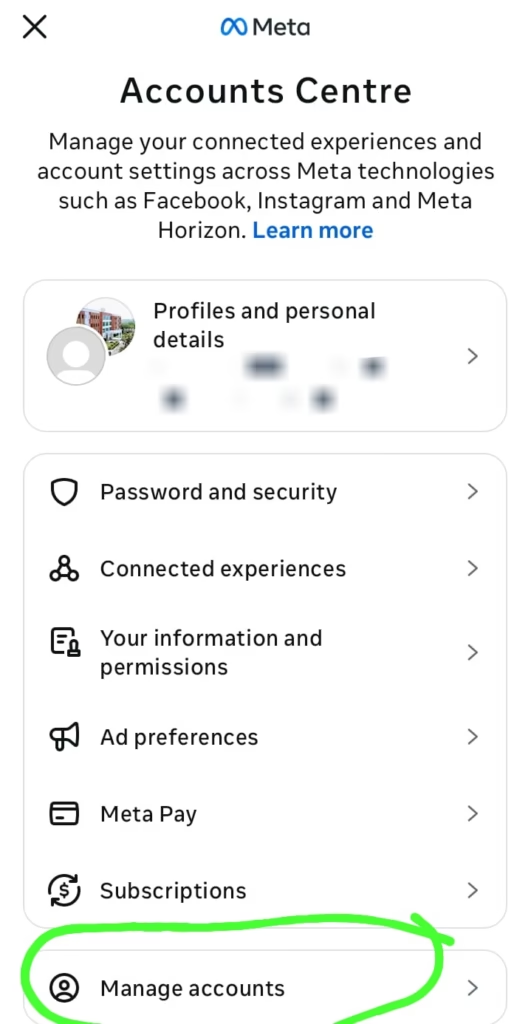
✅Step 4: Click on manage accounts
Scroll Down You can see More ways to manage
✅Step 5: Click on Account ownership and control
You can see
◉ Memorialisation
◉ Deactivation or deletion
✅Step 6: Select on deactivation or Deletion
Choose Your account which you want to delete
✅Step 7: Select The option
◉Deactivate account (temporarily) ◉Delete account (permanently)
Select on DELETION ACCOUNT Then Click on Continue
✅Step 8: Confirm The request
Instagram might Be Ask:
◉ a reason
◉ your Password
Tap To Delete Account to FINISH👍
➡️Your Account is now scheduled for deletion process.
Reminder: If you want to cancel Deletion, Login within 30 days.
How To Deactivate (temporarily) Your Instagram Account :
Here, Instagram will hide your account and also data will be not deleted here it keeps your data safe.
EXAMPLE :
Photos, likes, and comments will be hidden.
👉 STEPS TO FOLLOW:
In Above, Up to STEP 6 FOLLOW SAME
✅Step 7: Click on Deactivate
NOW, Click on Continue.